---
title: VPN Profiles, HES & Meter Identity
description: Managing WireGuard (dial/listen), IPsec, and OpenVPN profiles (vpn.manage), meter destination policies, US-1.19 meter serial overrides/swap confirmations (meter.identity.override), and cross-tenant HES diagnostics.
---
# VPN Profiles, HES Connectivity & Meter Identity
**Who is this for:** Platform Administrator (Platform ADMIN) Central Operations Team (Platform SERVICE, fleet & HES probes)
---
## 1. Managing VPN Profiles (`vpn.manage` - Platform ADMIN Only)
WattDee supports shared **WireGuard**, **IPsec**, and **OpenVPN** profiles scoped to each solar developer organization so meters across all of that developer's sites can share managed tunnels.
1. Open **Settings** > choose the target **Solar developer** > click the **VPN profiles** tab.
2. Click **Add VPN profile** (or select a profile and click **Edit settings**).
3. *(Optional)* For **WireGuard** or **OpenVPN**, expand **Import configuration**, paste the router/client config text, and click **Review imported settings** to prefill fields.
4. Enter **Connection details**:
- **Connection name** and **Protocol** (`WireGuard`, `IPsec`, `OpenVPN`).
- **For WireGuard (Connection mode):**
- **We dial the site (`dial`):** Use when the site gateway has a static public IPv4. Enter **Peer IPv4 address** and **Peer port** (default `51820`).
- **The site dials us (`listen`):** Use when the site connects over **4G / CGNAT** without a public IP. Enter **Server UDP port** (`1024–65535`, default `51821`) and **open that UDP port in the server firewall** (no peer IP required).
- **Allowed meter networks (CIDR):** e.g., `10.10.0.0/24` *(every meter bound to this profile must have an IP within these CIDR ranges)*.
- Fill protocol credentials (WireGuard local tunnel CIDR, peer public key, keepalive; IPsec IKEv1/IKEv2, PSK or PEM certs; OpenVPN UDP/TCP, server cert name, PEM bundle, optional TLS Crypt). Check **Replace credentials** when rotating keys on an existing profile.
5. Click **Save VPN connection** and verify the status settles on **Tunnel established** (or **Runner ready**).
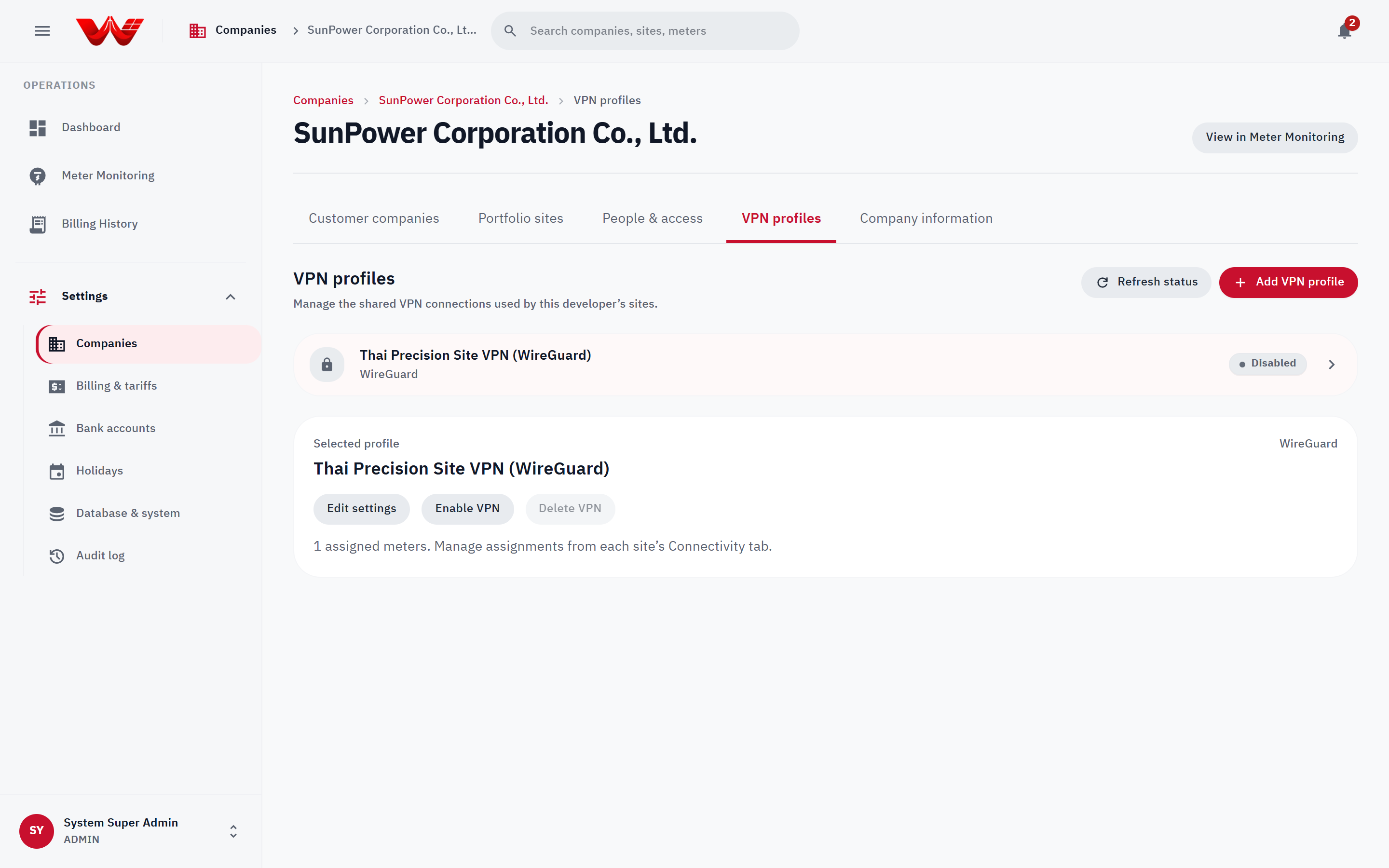
*Figure 1: VPN profiles workspace displaying active tunnel status and protocol settings.*
### Assigning a VPN Profile to a Site Meter
1. Open the target site > **Connectivity** tab.
2. Select the VPN profile, choose the meter under **HES meter**, and click **Assign meter**.
3. Click **Unassign** only when detaching a meter from the tunnel *(unassigning immediately halts HES polling for that meter)*.
---
## 2. Meter Destination Allowlist Policy
Outbound TCP probes (`Test connection`, `Read now`) and scheduled `.NET HES` polling support explicit IPv4 CIDR + TCP port allowlists before dialing field endpoints:
1. Inventory every active and inactive meter destination from `backend-api/`:
```bash
bun run db:meter-destinations
```
*(Read-only report listing developer org, public meter ID, HES meter UUID, active state, and target `host:port`. Handle output as internal operational data.)*
2. Configure matching environment variables:
- `METER_DESTINATION_POLICIES`: JSON map keyed by `developerOrgId` -> `[{ cidr, ports }]` for `hes-command-worker`.
- `HES_METER_DESTINATION_POLICIES`: JSON map keyed by **HES meter UUID** -> `[{ cidr, ports }]` for `hes-service`.
3. Verify all live endpoints (including VPN subnets) in observation mode before switching on `METER_DESTINATION_MODE=enforce` and `HES_METER_DESTINATION_MODE=enforce`. *(Enforcement mode refuses loopback, link-local, multicast, unspecified, and IPv6 addresses, and verifies all DNS answers before pinning TCP connections.)*
---
## 3. Meter Identity Override & Swap Confirmation (`meter.identity.override`)
Under **US-1.19**, HES discovers each meter's serial number on its first successful read and blocks billing whenever an observed serial disagrees or collides with another meter. Only **Platform ADMIN** holds `meter.identity.override`:
1. Open the site under **Settings > Meters** (or drill in from **Meter Monitoring**).
2. Inspect pending or blocked states (`Waiting for HES to read the serial`, `Duplicate serial`, or `Suspected meter swap` / `Identity check failed`).
3. Verify the physical nameplate with the developer team, then run **Correct serial** or **Confirm swap**.
4. Provide an explicit **Audit reason** *(minimum **5 characters**)*, recorded permanently in the System Audit Log.
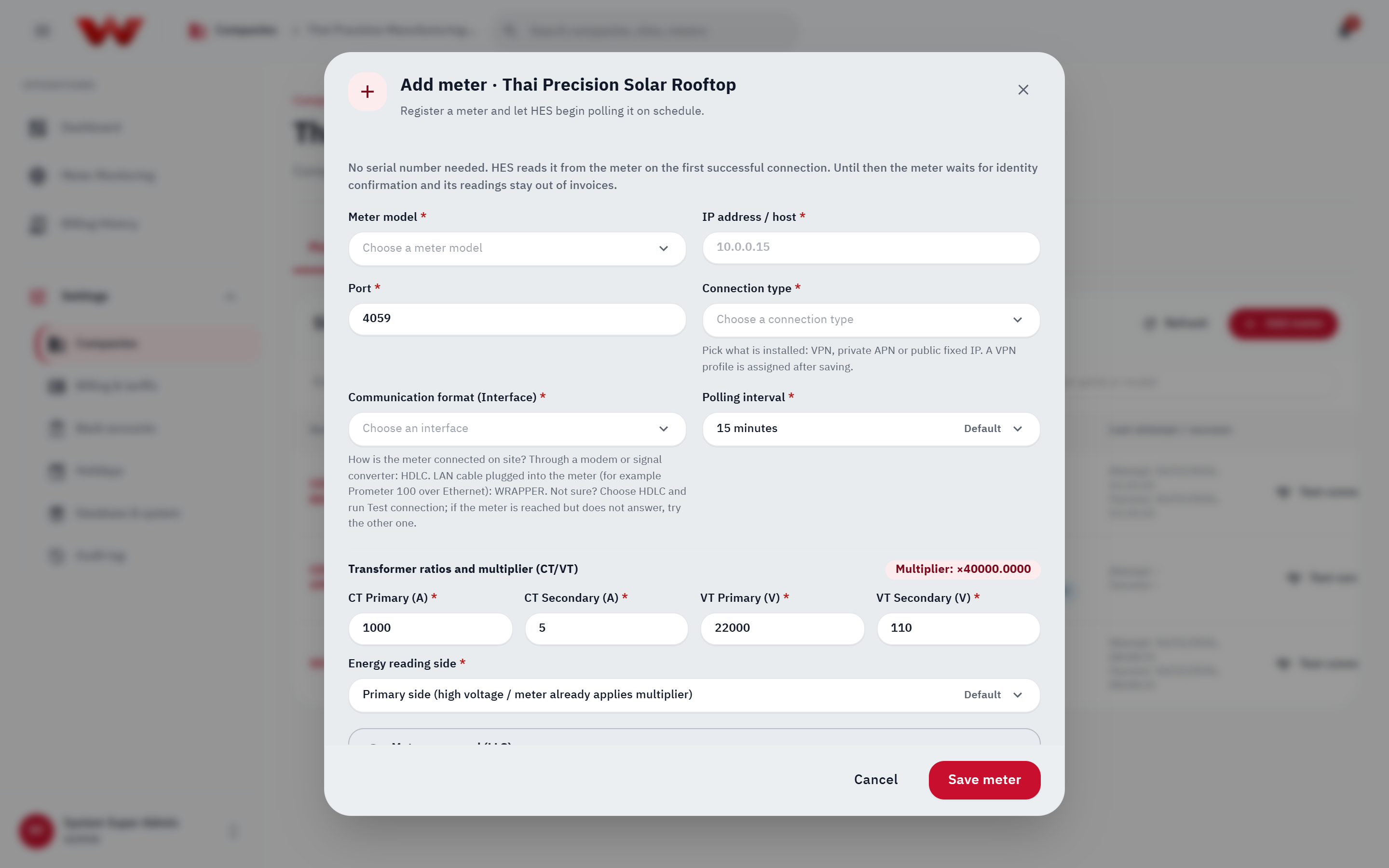
*Figure 2: Site meter list used to verify HES identity states, CT/VT configuration, and perform serial overrides.*
---
## 4. Cross-Tenant Fleet Monitoring & HES Diagnostics (`Platform ADMIN` & `SERVICE`)
Both `Platform ADMIN` and `Platform SERVICE` can monitor and probe meters across every developer from `/meter`:
- **View as > Developers:** Aggregate online rates per Solar Developer to detect regional or VPN gateway incidents quickly.
- **Meter Diagnostics (`/meter` side panel):** Run **Test connection** or **Read now** to isolate `config_error` (missing LLS secret on HES host), `auth_failed`, `operation was canceled` (`HDLC` vs `WRAPPER` mismatch), or `connect_failed` / `poll_timeout` (verify Droplet-to-container VPN routing and firewall rules).
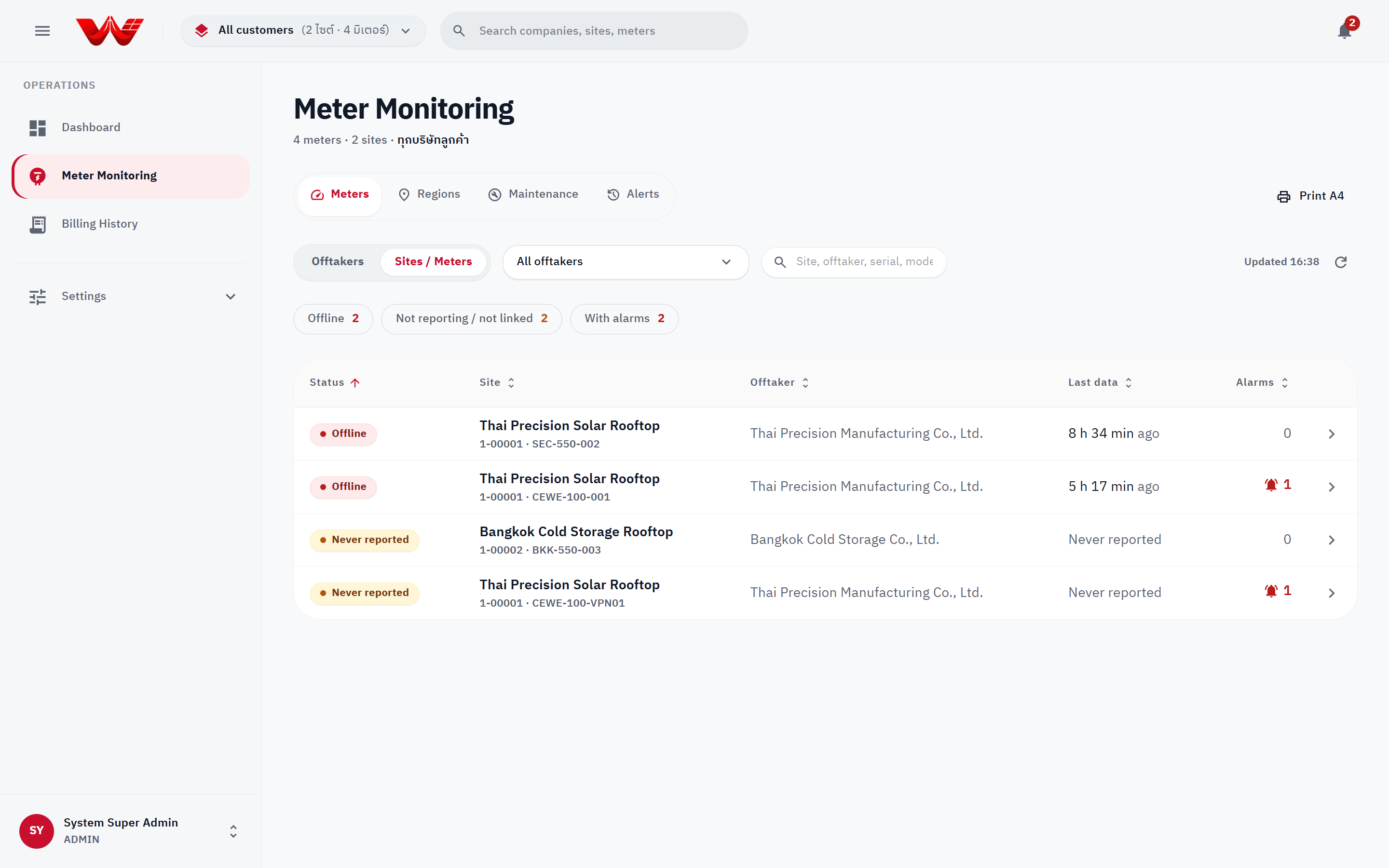
*Figure 3: Cross-tenant Meter Monitoring fleet board sorted worst-first.*
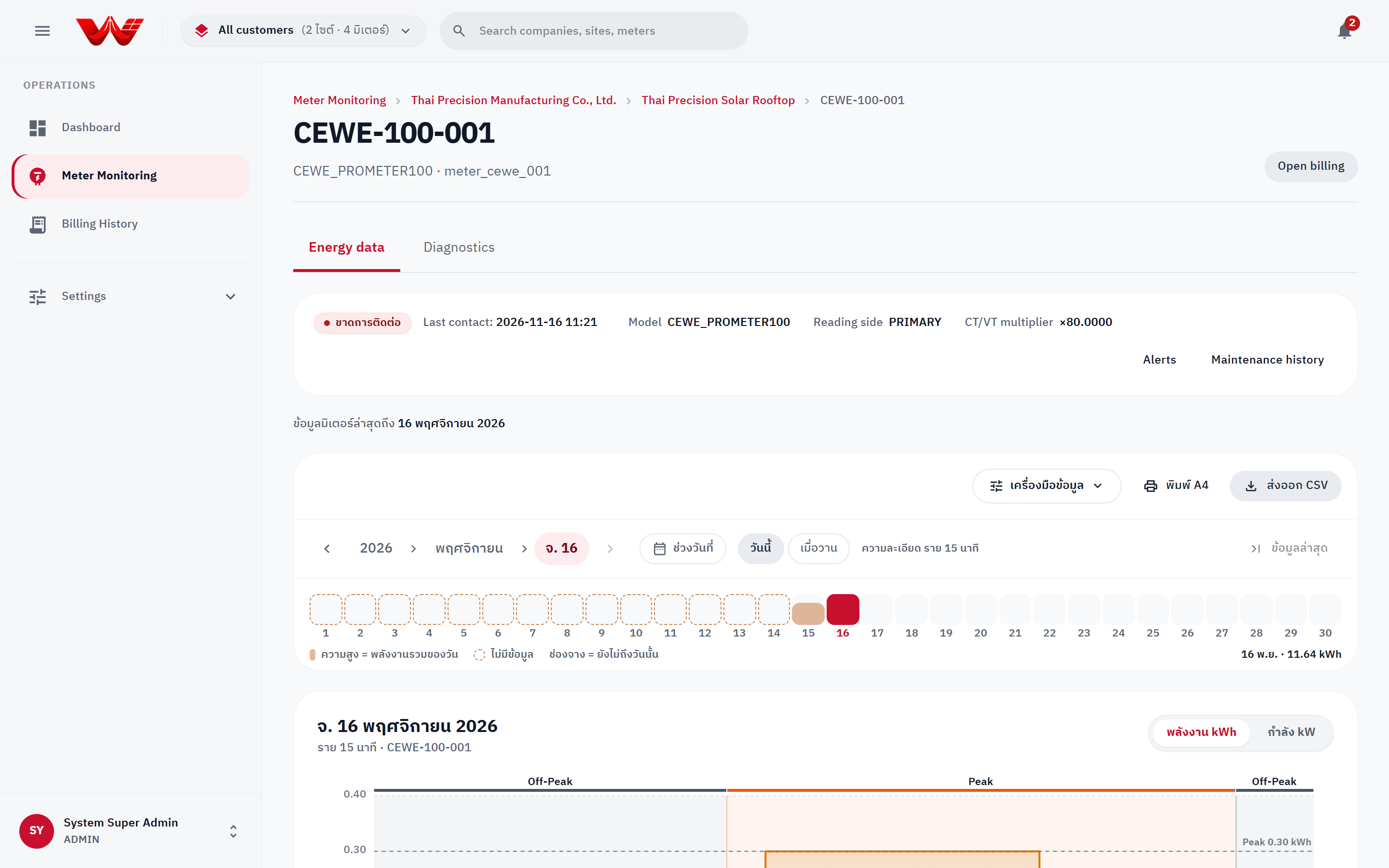
*Figure 4: Meter detail and HES diagnostics panel.*
---
## Next Steps
- [Chapter 05: Database Health, Audit Log & Support Ops](./05-database-audit-and-platform-ops)