Internal Platform Documentation
This guide covers privileges and governance procedures restricted to the Platform Owner organization (SUPER_ADMIN / org_avg_super).
Platform Roles & Governance
Who is this for: Platform Administrator (Platform ADMIN) Central Operations Team (Platform SERVICE)
1. Platform Owner Authorization Tier (SUPER_ADMIN)
Accounts belonging to the platform owner organization (Advanced Grid Co., Ltd., ID org_avg_super, organizations.type = 'SUPER_ADMIN') have platform-wide tenant visibility (tierOf(authCtx) === 'platform'). Two assignable roles exist at the platform tier (ROLES_ASSIGNABLE.platform):
| Role Code | UI Label | Capabilities | Responsibilities & Restrictions |
|---|---|---|---|
ADMIN | Platform administrator | 33 / 33 | Holds every CAPABILITIES entry across every organization, site, meter, invoice, and shared reference table (org.admin, ftrate.write, holiday.write, bank.write, vpn.manage, meter.identity.override, policy.read, invoice.*, telemetry.*). |
SERVICE | Central operations team | 9 / 33 | Monitors meters and HES communications across all sites: view organizations, register/edit/replace meters (meter.write), send connection tests and read-now commands (meter.command), inspect meter IP/port/SIM (meter.network.read), repair 15-minute telemetry (telemetry.sync), view telemetry quality reasons (telemetry.quality.read), manage alarms (alert.manage), view parallel billing comparison (invoice.compare), and read reference rates/holidays (reference.read). (Cannot manage organizations/users, edit tariffs/Ft/banks/holidays, manage VPNs, override meter serials, or issue/approve invoices.) |
Six Platform-Admin-Only Governance Capabilities
Although Solar Developer ADMIN accounts manage their own customers, sites, meters, and billing workflows, 6 cross-tenant capabilities remain strictly reserved for Platform ADMIN:
org.admin: Creating/deleting developer organizations, changing organization types, adjustingActive meter limitquotas, moving users/sites across organizations, and inspecting the system-wide Audit log.ftrate.write: Publishing and updating monthly Ft rates.holiday.write: Seeding and editing the shared Public holiday calendar.bank.write: Managing Payment bank accounts (platform defaults and per-developer overrides).vpn.manage: Creating, editing, enabling/disabling WireGuard, IPsec, and OpenVPN VPN profiles and assigning meters.meter.identity.override: Overriding a pending/duplicate meter Serial number or confirming an HES-detected meter Swap with a mandatory audit reason (and overriding locked customer countersignatures when authorized).
2. Auditing Live Permissions (GET /api/permissions)
- Open Settings and select any organization (Platform administration, any Solar Developer, or any Customer company).
- Click the People & access tab and select Role permissions.
- The portal renders a read-only table served directly by
GET /api/permissionsfrombackend-api/src/auth/policy.ts, guaranteeing exact alignment between the UI and API route enforcement across all 3 tiers (platform,developer,customer).
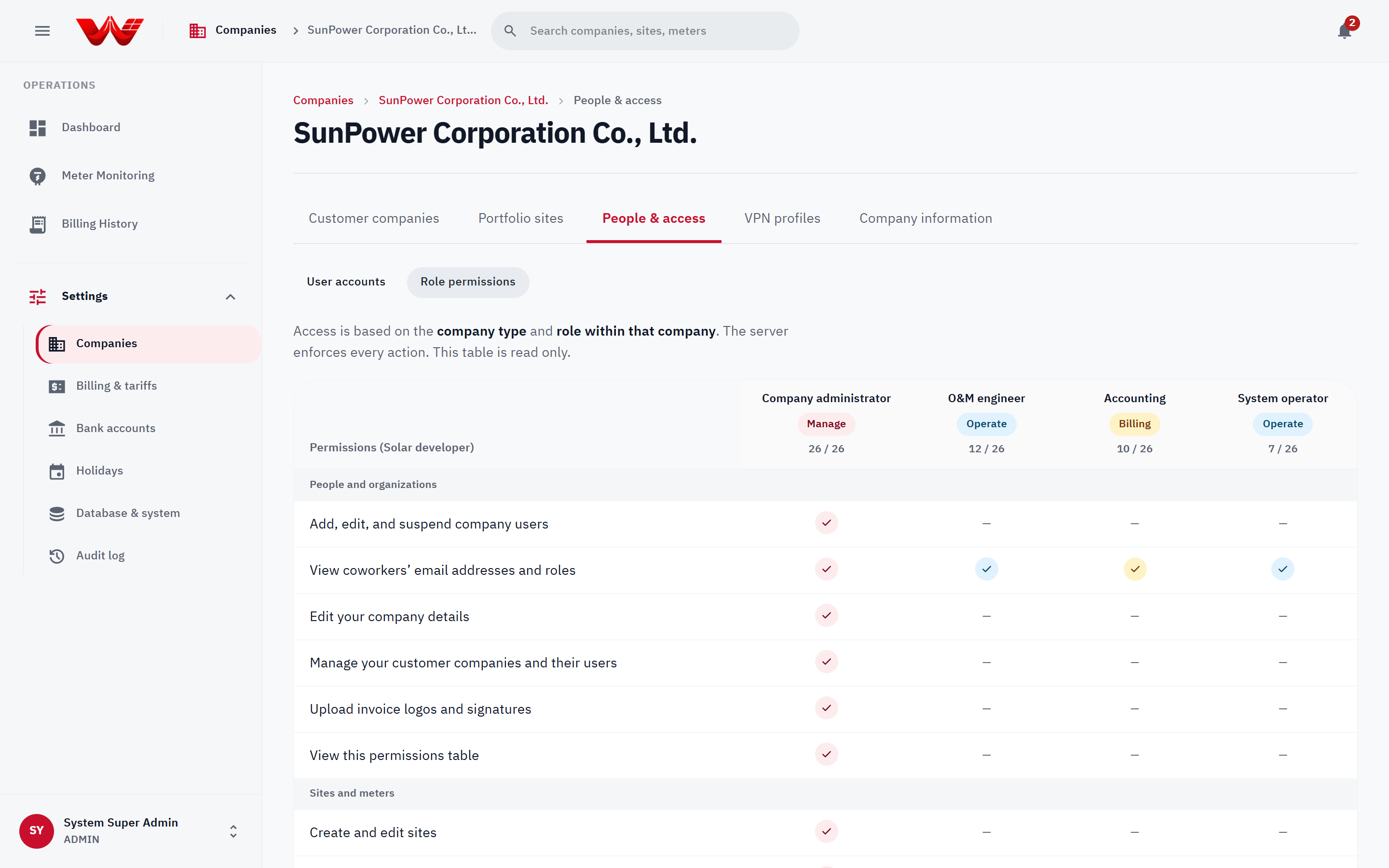 Figure 1: Live server-backed Role permissions matrix in Settings.