
Database Health, Audit Log & Platform Operations
Who is this for: Platform Administrator (Platform ADMIN) Central Operations Team (Platform SERVICE, Database & system tab)
1. Database & System Health (Settings > Database & system)
(Accessible to Platform ADMIN, Platform SERVICE, and roles holding meter.network.read.)
- Open Settings > Database & system.
- Inspect infrastructure metrics:
- Database size and PostgreSQL server version.
- Monthly partitions (
load_profile_15minpartitions): checkReadyvs.Partition needs extension, along with per-partition row counts and disk sizes. (Extend upcoming partitions proactively viabun run --cwd backend-api db:partitionsbefore a new year begins.) - Meter data sync (HES): projection lag in seconds and count of active meters waiting over 1 hour.
- System record counts: total Projects, Meters, Invoices, and Audit events.
- Click Refresh status to pull live metrics (or query
/api/health/readyvia operations monitoring).
2. System Audit Log (Settings > Audit log)
(Restricted exclusively to Platform ADMIN holding org.admin.)
- Open Audit log under Settings.
- Filter platform-wide activity by:
- Search audit events (action, entity ID, or summary)
- Filter by actor email
- Category:
All categories,Meter data,Invoices,PPA contracts,Meters - From and To date bounds
- Click Export current page to download the visible CSV slice (use filters and pagination for historical ranges).
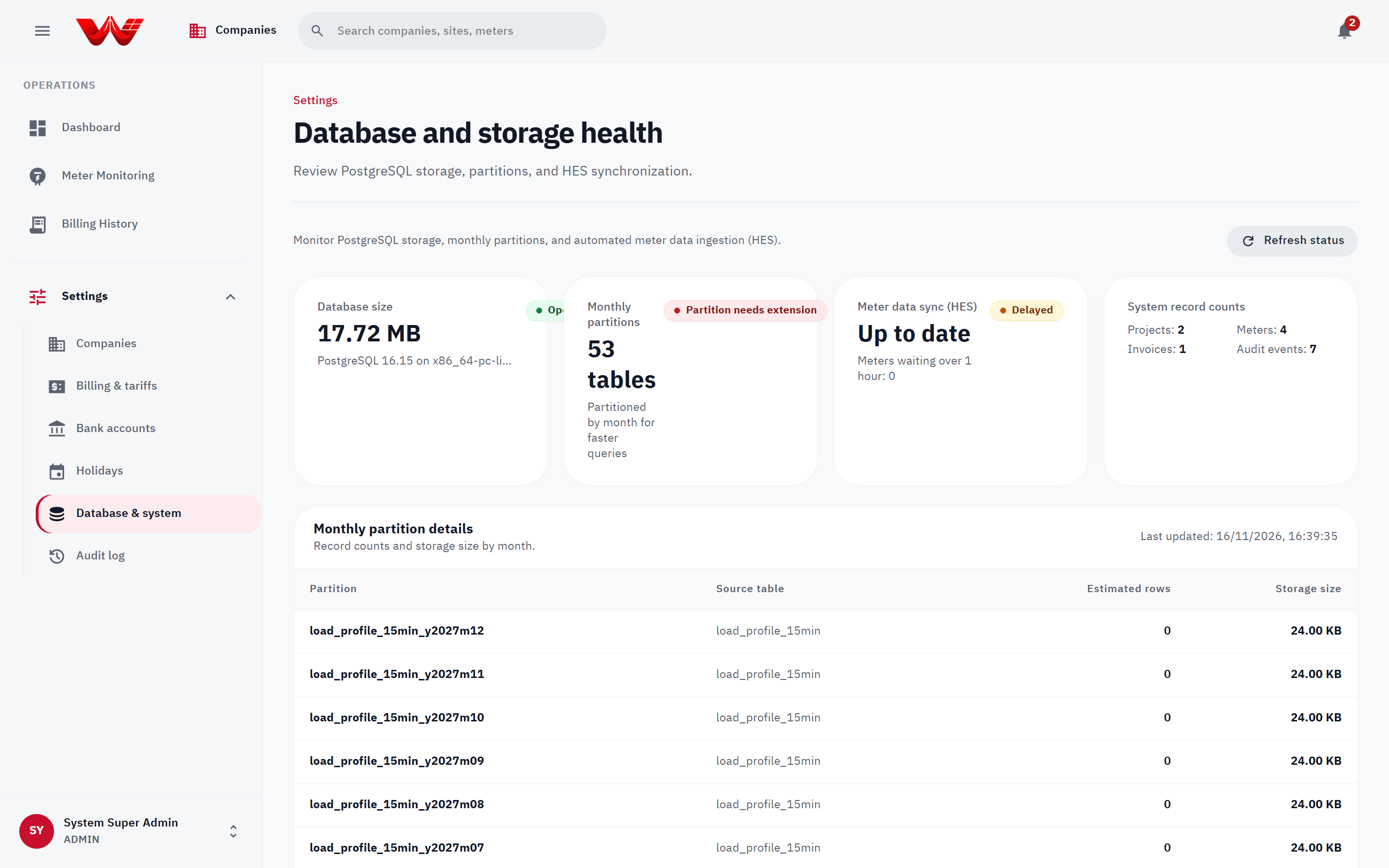 Figure 1: Platform governance views for Database & system health and Audit log exports.
3. Private Signature Storage Migration
Authorized company signatures and customer countersignatures are stored privately under private/signatures/ and served strictly via authenticated endpoints (Cache-Control: private, no-store). When upgrading legacy tenants with keys still under public/signatures/, run from backend-api/ against the target environment after taking backups:
- Dry-run inventory (read-only):bash
bun run db:migrate:signatures - Copy legacy signature objects to private storage and update references:bash
bun run db:migrate:signatures --apply - Verify signature previews and historical PDF/Excel/Word exports across migrated organizations and invoices.
- Purge legacy public objects (only after verifying step 3):bash
bun run db:migrate:signatures --purge
4. Platform Support Escalations
- Replacing locked customer countersignatures (
409 Conflict): Once a customer or developer saves a countersigned PDF or signature image, updates return409 Conflictto preserve immutability. Only Platform ADMIN may arrange a supervised replacement after verifying approval from both counterparties. - Recovering locked-out Company Administrators: When all
Developer ADMINorCustomer ADMINaccounts of an organization are unavailable, reset the administrator password in that organization's People & access tab. - Meter quota increases & urgent early billing (
invoice.issueEarly): Review active meter utilization and cycle status before raising an organization'sActive meter limitor issuing an early bill.
 Figure 2: WattDee sign-in screen used by platform staff before switching across developer portfolios.
5. Connecting AI Assistants & MCP to the Platform Admin Manual
The Platform Admin Manual is deployed independently at https://admin-docs.wattdee.com (isolated from the public Solar Developer manual at docs.wattdee.com):
| Interface | URL / Command | Notes |
|---|---|---|
Admin /llms.txt | https://admin-docs.wattdee.com/llms.txt | Structured Thai/English index of all Platform Admin guides |
Admin /llms-full.txt | https://admin-docs.wattdee.com/llms-full.txt | Full Platform Admin Markdown bundle (/th/llms-full.txt, /en/llms-full.txt also published) |
| Admin Remote HTTP MCP | https://admin-docs.wattdee.com/api/mcp | Streamable HTTP JSON-RPC 2.0 endpoint exposing search_wattdee_admin_manual, get_wattdee_admin_guide, and get_role_capabilities (including platform tier) |
| Admin Local Stdio MCP | bun run docs:admin:mcp | Local stdio MCP server for internal platform operators |
{
  "mcpServers": {
    "wattdee-admin-docs": {
      "command": "bun",
      "args": ["run", "docs:admin:mcp"],
      "cwd": "/path/to/AMR"
    }
  }
}